


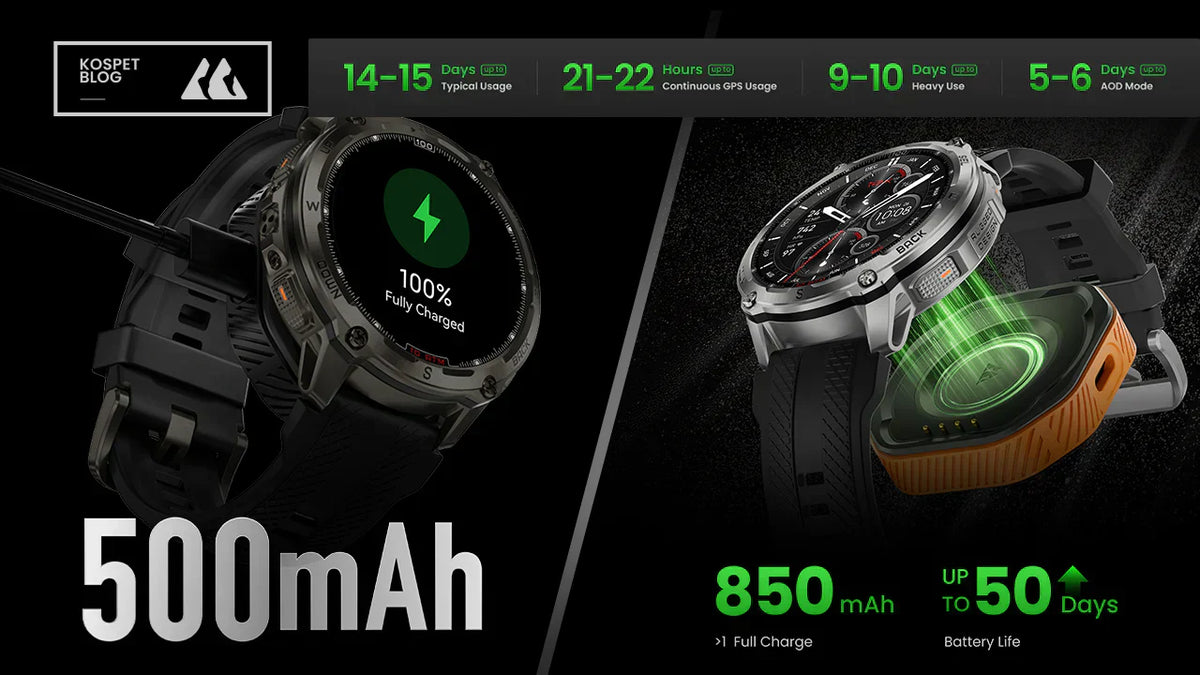
Yes, it depends on how you use the watch. A long battery life smartwatch can drop faster than expected because a few features keep it working in the background for hours, not minutes.
If you want a battery expectation you can trust, start by identifying the one feature you run the longest each day, because that single habit usually predicts whether you charge daily, every few days, or weekly.
Long Battery Life Smartwatch Meaning
Long battery life is not a universal number of days. It means the watch lasts long enough under your most common day of use to match your charging habit without forcing you to compromise mid-day.
Most battery claims quietly assume a light day with limited GPS, fewer screen wake-ups, and lighter health tracking, so the number stops being useful the moment your routine is heavier.
Set a clear baseline before you judge any watch: use your typical weekday as the reference day and write down four things—how often you use GPS, whether always-on display is on, whether health tracking runs all day, and whether notifications are frequent.
From that point on, compare battery life only under the same baseline, otherwise you are comparing different workloads.
Long Battery Life Across KOSPET Smartwatch Usage Modes
This is where the “depends on how you use it” idea comes measurable. Instead of treating battery life as a single number, the table below frames it as a set of usage modes that change the load on the watch.
KOSPET smartwatches are used here as a consistent reference to show how battery life shifts when GPS tracking, display behavior, and health monitoring intensity change. Read it as a mode comparison, not a model ranking.
| KOSPET watch | Typical Usage Mode | Heavy Usage Mode |
|---|---|---|
| KOSPET TANK T4 | up to 15 Days | up to 10 Days |
| KOSPET TANK T3 Ultra 2 | up to 15 Days | up to 8 Days |
| KOSPET TANK T3 | up to 15 Days | up to 8 Days |
| KOSPET TANK M4 | up to 15 Days | up to 10 Days |
| KOSPET TANK M3 Ultra | up to 15 Days | up to 8 Days |
| KOSPET TANK M3 | up to 15 Days | up to 8 Days |
| KOSPET MAGIC P10 | up to 13 Days | up to 9 Days |
| KOSPET MAGIC R10 | up to 13 Days | up to 9 Days |
| KOSPET ORB | up to 17 Days | up to 11 Days |
| KOSPET PULSE | up to 17 Days | up to 11 Days |
Note:The Tank T4 and M4 are equipped with an additional power pocket, which extends battery life up to 30 days.
Why a Long Battery Life Smartwatch Drains Fast
A smartwatch usually drains fast for a simple reason: you are running one long-duration load that keeps the watch “awake” more than you realize. The four usual drivers are GPS, screen behavior, health sensor frequency, and constant syncing from notifications and app updates. You do not need to troubleshoot all four at once, because one of them is almost always the main contributor.
To find the main one, use a one-day check: keep everything normal, then look at what ran the longest—GPS sessions, hours of screen-on time, continuous health monitoring, or nonstop notifications. Whichever one dominated your day is the first place your battery expectation and your buying decision should be anchored.
GPS Battery Life in a Long Battery Life Smartwatch
If you use GPS often, battery life is measured in tracking time, not calendar days. GPS keeps the watch in a sustained high-power state while it records location data continuously, so even a multi-day watch can feel short if you track long workouts frequently.
A practical rule is this: if you run GPS sessions on most days of the week, treat GPS mode runtime as your primary battery metric and treat day-based claims as a different, lighter use case.
Reading tip:When comparing watches, keep GPS expectations consistent. Use the same workout length, similar frequency, and the same habit of starting and stopping sessions. Otherwise, you are comparing different usage loads rather than different battery performance.
Display Battery Life for Long Battery Life Smartwatch Users
Your display habits can make or break long battery life. Always-on display raises the baseline drain all day, and frequent wake-ups add extra drain even if you do not use always-on mode.
A simple check is to notice whether you glance at the screen dozens of times an hour, because screen-on behavior often matters more than brightness in day-to-day battery results.
Reading tip: Decide first whether always-on display is a must-have. If it is, only compare battery expectations with always-on display enabled. If it is not, treat raise-to-wake behavior as your baseline when judging long battery life.
Health Tracking Battery Life on a Long Battery Life Smartwatch
Health tracking drain depends mostly on how often sensors run and how continuously they stay active. Occasional checks and sleep tracking are usually manageable, but 24/7 monitoring keeps sensors and background processing running all day, which can shorten battery life in a way that feels sudden.
A useful verification step is to keep your routine the same for one day and reduce monitoring intensity, because if battery life noticeably improves, the problem was workload, not battery aging.
Reading tip: If battery life drops after you enable more health features, it is usually not battery aging. It is a heavier daily workload. Judge battery life using continuous monitoring expectations if 24-hour tracking is important to you.
How to Choose a Long Battery Life Smartwatch Based on Your Usage
Choose a smartwatch by the heaviest thing you do with it, not the lightest claim on the box.
| Heaviest Usage Load | What to Check for Battery Life | Why It Matters |
|---|---|---|
| Frequent GPS Workouts | Battery descriptions that explicitly mention GPS tracking time | GPS keeps the watch in a sustained high-power state, so day-based claims no longer apply |
| Always-On Display Enabled | Battery expectations with always-on display turned on | AOD raises baseline power use throughout the day, changing real-world runtime |
| Continuous Health Tracking | Battery performance under full-day and overnight monitoring | 24/7 sensor activity creates steady background load that accumulates over time |
The buying standard is strict but simple: if the product information cannot describe battery life in the mode you actually live in, you should assume the headline number will not match your experience.
Conclusion
Yes, battery life depends on how you use the watch, because a few long-running features dominate the daily drain. The fastest way to avoid disappointment is to stop treating battery life as a single number and start treating it as a mode outcome. Keep one rule: judge any long battery life smartwatch by your heaviest mode, because that is the only battery life you will feel.
FAQ
Why does my smartwatch battery drain fast even when I am not actively using it?
Because the watch can still be working in the background through sensors, screen wake-ups, and syncing. The practical test is to reduce one driver for a day, such as fewer notifications or lighter health monitoring, and see whether battery life changes noticeably.
How should I judge long battery life smartwatch claims before buying?
Match the claim to your heaviest mode, not the lightest scenario. If you cannot find battery information tied to your usage, such as GPS time, always-on display, or continuous monitoring, treat the claim as a standby estimate and keep looking.
Does frequent GPS use mean I cannot have long battery life?
No, but it changes the unit that matters. If you use GPS often, judge battery by tracking time and look specifically for GPS-mode endurance rather than day-based numbers.



Leave a comment
This site is protected by hCaptcha and the hCaptcha Privacy Policy and Terms of Service apply.